


AI training is resource-intensive. It takes massive datasets, advanced algorithms, and specialized hardware (read: costly GPUs) to teach a model how to understand language, images, or audio. But even after that training is complete, running inferences (the process of generating outputs) can be equally taxing.
Querying an LLM in real time for every user request isn’t just expensive, it’s inefficient. Especially when the answer might already exist. To solve this challenge, development teams turned to vector databases.
Unlike traditional databases that rely on exact keyword matches, vector databases store information as high-dimensional embeddings like numerical representations of data like text, images, or sound. This makes it possible to perform semantic searches. So instead of looking for exact words, you’re looking for meaning.
That distinction is essential in use cases like:
- Retrieval-augmented generation (RAG)
- Recommendation engines
- Question-answering systems
- Semantic search
With vector databases, AI systems can retrieve relevant information faster and more efficiently by skipping unnecessary inference calls when the answer already exists in the vector index. There are many different vector database solutions, but today I’ll talk about pgvector, an open-source PostgreSQL extension that I personally use and would recommend. We’ll go through why I think it’s such a great tool and how you can get started with it.
Why pgvector is a Great Tool for Developers
To start, pgvector integrates vector search capabilities directly into PostgreSQL, one of the most widely adopted relational databases in the world. For developers and teams already working within a PostgreSQL-based environment, this presents a seamless, lower-friction option for building intelligent applications.
Rather than introducing a new, separate stack to manage, pgvector allows teams to store and query both relational and vector data in one place. This unification eliminates the complexity of syncing disparate databases and enables a simpler development lifecycle. AI applications often require combining different types of queries like structured filters, full-text search, and semantic similarity, all in a single operation. pgvector supports this hybrid search pattern natively by allowing developers to blend vector similarity scoring with SQL-based filters and joins. This allows you to search a corpus of documents not just by keyword, but also by semantic meaning, all while applying filters like document category or user permissions, within a single SQL query.
pgvector is built for real-world scalability and performance. For applications that need to serve fast results across millions of embeddings, pgvector supports approximate nearest neighbor (ANN) search through the IVFFlat indexing method. This enables rapid responses for latency-sensitive applications like AI-powered search bars or recommendation systems, while maintaining a good balance of accuracy and speed. For teams developing in Python, pgvector integrates smoothly into popular PostgreSQL client libraries like psycopg2, asyncpg, and SQLAlchemy, making it easy to slot into your existing data pipelines and ML workflows.
The versatility of pgvector is proving valuable across industries. We see e-commerce organizations use it to power personalized recommendations in order to boost conversions. A large media platform uses it to surface relevant content, keeping users engaged. Healthcare and life sciences teams rely on it for faster research, compound discovery, and diagnostic insights. At many tech companies, it’s enabling LLM-driven support and smarter internal tools.
What makes pgvector even more powerful is deploying it on a platform like Akamai Cloud. Akamai’s cloud solution gives teams the managed infrastructure, scalability, and global performance edge they need for production-grade workloads. Managed PostgreSQL on Akamai allows developers to deploy pgvector-backed applications without worrying about operational overhead. With automated backups, built-in security, and auto-scaling options, your stack stays resilient while your team stays focused on building. And because Akamai’s compute and network infrastructure is optimized for global delivery, applications that rely on fast inference or real-time recommendation engines benefit from lower latency and greater reliability at scale.
If you’re already using PostgreSQL or are looking for an AI-ready vector search engine that won’t require a complete stack overhaul, I’ll walk through how to get started with pgvector in the next section.
Getting Started With pgvector on Akamai
- Provision a PostgreSQL cluster using Akamai’s Managed Databases dashboard.
- Log in to Cloud Manager.
- From the main menu, select Databases.
- Click Create Database Cluster.
- In the Cluster Label field, enter a label so you can easily identify the cluster on your account. The label must be alphanumeric and between 3 and 32 characters.
- Select the database engine for your new database.
- Select the region in which the database cluster will reside.
- Every node of a database cluster is built on its own Linode. In the Choose a Plan section, select the Linode type and plan that the nodes will use.
- Click Create Database Cluster. It takes approximately 10 to 15 minutes to fully provision the cluster. You can track the status by reviewing the Status column in the Database Clusters list.
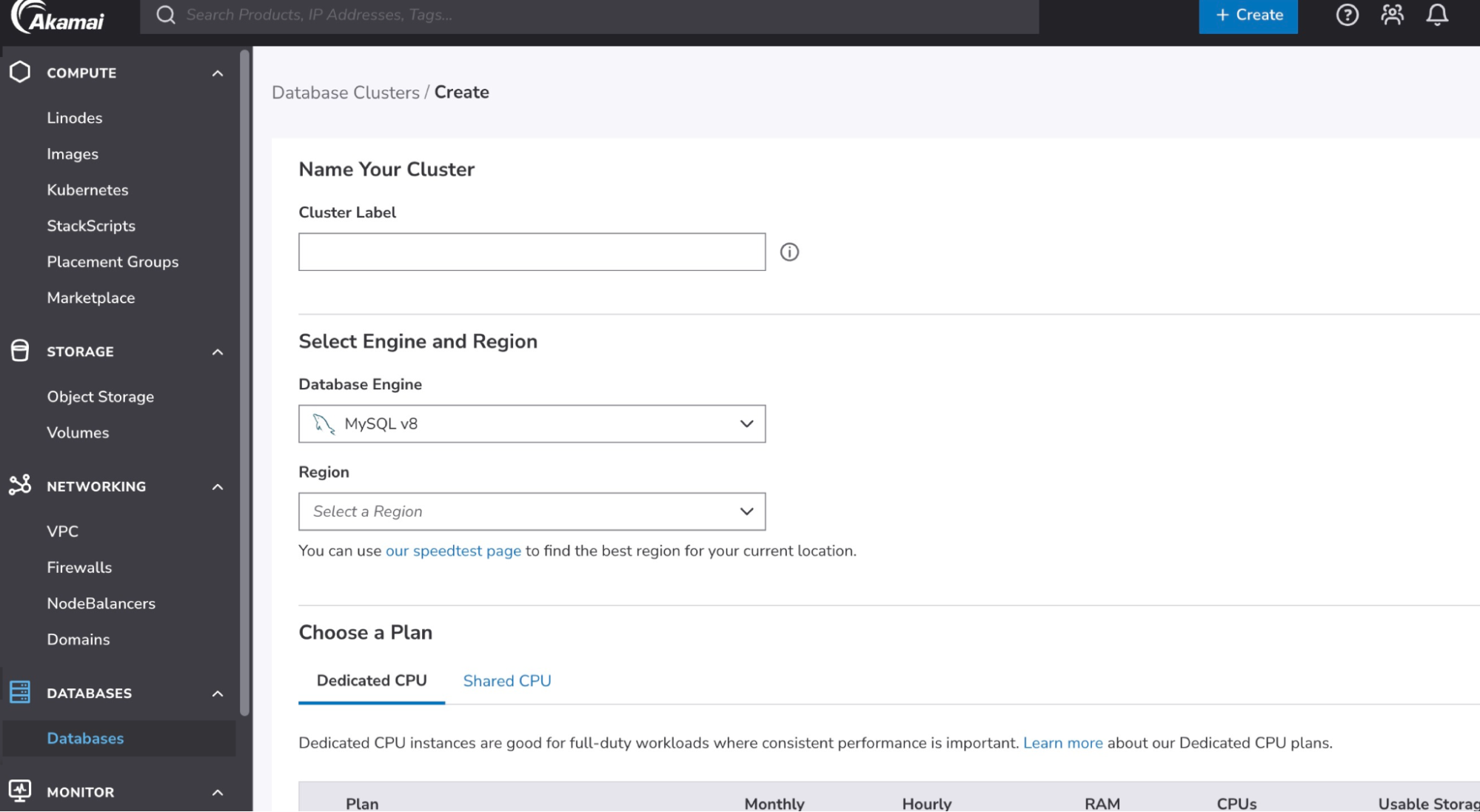
Note : You can provision using API’s as well
- Log in to your cluster
To connect directly to the database from the command-line, you can use the psql tool. This tool is included as part of most PostgreSQL server installations, though you can also install it separately on most operating systems.
Use the psql command below to connect to your database, replacing[host]and[username]with the corresponding values in the connection details section.psql --host=[host] --username=[username] --password --dbname=postgres - Install an extension
To install one of the available extensions on your database, use the CREATE EXTENSION command, replacing [extension_name] with the name of the extension you wish to install. In this case, the extension isvector.CREATE EXTENSION vector; - Define vector columns
After installing the vector extension, you have access to a new data type called vector. The size of the vector (indicated in parentheses) represents the number of dimensions stored in that vector. For this example, we’ll use 13, but for an actual use case it would be in the thousands.CREATE TABLE items ( id serial PRIMARY KEY, description text, embedding vector(13) ); - Insert embeddings from your ML model (like OpenAI’s or Hugging Face). To gather sample embeddings, you can use the below Python script, which was adapted from the Hugging Face demo. You will need to obtain a Hugging Face token for this example to work.
import requests
import psycopg2
import os

# Hugging Face Configuration
model_id = "sentence-transformers/all-MiniLM-L6-v2"
hf_token = os.environ.get("HF_TOKEN") # Set an environmental variable called HF_TOKEN with your Hugging Face token
api_url = f"https://router.huggingface.co/hf-inference/models/{model_id}"
headers = {"Authorization": f"Bearer {hf_token}"}

# Database Configuration
db_conn_string = os.environ.get("DB_CONN_STRING") # Replace with your connection string or set an env var

# Source for Embeddings
source_sentence = "How do I get Medicare?"
sentences = [
    "How do I get a replacement Medicare card?",
    "What is the monthly premium for Medicare Part B?",
    "How do I terminate my Medicare Part B (medical insurance)?",
    "How do I sign up for Medicare?",
    "Can I sign up for Medicare Part B if I am working and have health insurance through an employer?",
    "How do I sign up for Medicare Part B if I already have Part A?",
    "What are Medicare late enrollment penalties?",
    "What is Medicare and who can get it?",
    "How can I get help with my Medicare Part A and Part B premiums?",
    "What are the different parts of Medicare?",
    "Will my Medicare premiums be higher because of my higher income?",
    "What is TRICARE ?",
    "Should I sign up for Medicare Part B if I have Veterans' Benefits?"
]

# Hugging Face API Query Function
def get_embeddings(source_sentence, sentences):
    """Queries the Hugging Face API to get sentence embeddings."""
    try:
        response = requests.post(
            Api_url,
            headers=headers,
            json={"inputs": { "source_sentence": source_sentence, "sentences": sentences }, "options": {"wait_for_model": True}}
        )
        response.raise_for_status()  # Raise an exception for bad status codes (4xx or 5xx)
        return response.json()
    except requests.exceptions.RequestException as e:
        print(f"Error querying Hugging Face API: {e}")
        return None

# Main Execution
print("Fetching embeddings from Hugging Face...")
embeddings = get_embeddings(source_sentence, sentences)

if embeddings:
    print(f"Successfully fetched {len(embeddings)} embeddings.")
    conn = None
    Try:
        # Establish connection to the database
        print("Connecting to the PostgreSQL database...")
        conn = psycopg2.connect(db_conn_string)
        cur = conn.cursor()
        print("Connection successful.")

        # Insert descriptions and embeddings into the database
        print("Inserting data into the 'items' table...")
        for description, embedding in zip(sentences, embeddings):
            # The pgvector extension expects the vector as a string representation of a list
            cur.execute(
                "INSERT INTO items (description, embedding) VALUES (%s, %s)",
                (description, embeddings)
            )

        # Commit the transaction to make the changes permanent
        conn.commit()
        print(f"Successfully inserted {cur.rowcount} records into the database.")

    except psycopg2.Error as e:
        print(f"Database error: {e}")
        if conn:
            conn.rollback() # Rollback the transaction on error

    Finally:
        # Ensure the connection is closed
        if conn:
            cur.close()
            conn.close()
print("Database connection closed.") - Use pgvector’s indexing & search
Create the index after the table has some data

CREATE INDEX ON items USING ivfflat (embedding vector_cosine_ops);

SELECT *, embedding <-> query_embedding AS similarity FROM items ORDER BY similarity LIMIT 5;
Vector databases are helping teams optimize performance, reduce inference costs, and deliver smarter, faster user experiences, and extensions like pgvector make it easier to bring semantic search and hybrid queries into familiar environments like PostgreSQL, without overhauling your architecture.
Learn more about how to deploy and use pgVector and other available extensions in our docs.






Comments